Variant: MSP (Modelling-Simulating-Processing)
The essentials of OfficeTalk: All about the facts
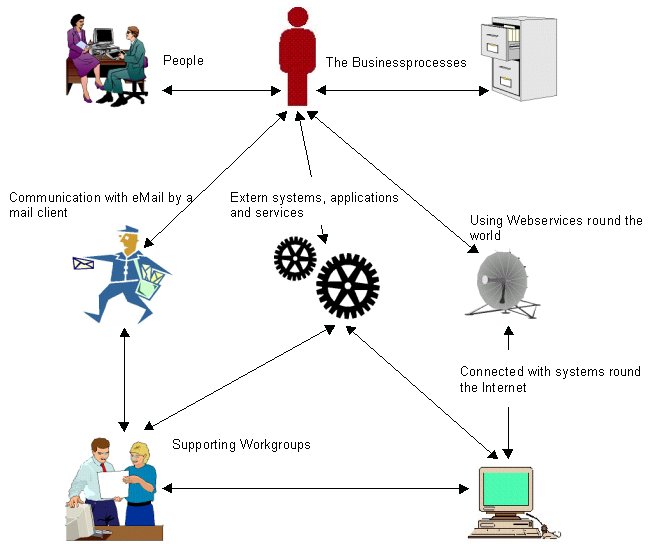
Boosting processes with OfficeTalk
The shortcuts to all headers:
General aspects, Target groups for OfficeTalk/MSP, Advantages and goals of OfficeTalk/MSP, Integration of other systems and services, Supported platforms, Supported databases, The specification, The
open product variant OfficeTalk/OP
OfficeTalk/MSP is a generic system for defining and controlling all kind of business processes. It can be used on different platforms. Many applications can be integrated into the workflow of a process. The amount of useable workstations, supported by OfficeTalk/MSP, depends on the used database system. OfficeTalk/MSP is developed with modern technologies and uses component architecture.
With OfficeTalk-MSP.pdf you get the fact sheet of OfficeTalk/MSP. (With OfficeTalk-MS.pdf you get the fact sheet of the variant OfficeTalk/MS). With OfficeTalk/OP you get the fact sheet of OfficeTalk/OP
Target groups for OfficeTalk/MSP
OfficeTalk/MSP is independent of any industry type. Some examples of industry types:
Advantages and goals of OfficeTalk/MSP
Integration of other systems and services
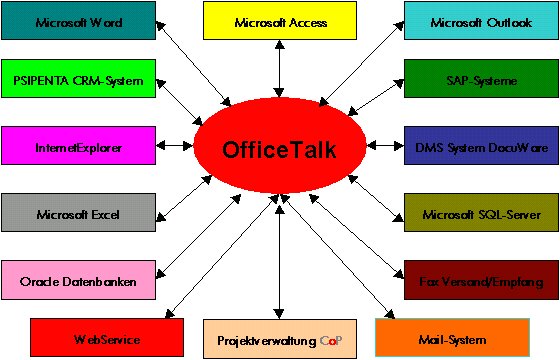
The execution of a part of a process can be delegated by OfficeTalk/MSP in the sense of Software as a Service (SaaS) to an extern system, which is suited better for the required request. OfficeTalk/MSP can start, end and control these systems with:
COM- and .NET-Connect uses on Windows-platforms the Microsoft component and communication protocol. With these you can integrate all OLE-, OCX-, ActiveX- und .NET-Applications into business processes. Beginning from the text system Microsoft-WinWord to the complex machine control system. For Microsoft-WinWord, Microsoft-Access, Microsoft-Internet Explorer, Microsoft-Outlook, Microsoft-ADO, SMC´´´-CoP, DocuWare-DMS and Oracle a prefactured OLE-, OCX- or ActiveX-Connect is available.
Webapplications can be integrated with HTTP-Request- and Webservice-Connect into the execution of a business process. HTTP-Request- and Webservice-Connect are supported on all platforms.
The integration of extern systems with these technologies is much more than starting and ending an application. COM-, .NET-, HTTP-Request- and Webservice-Connect in conjunction with OfficeTalk Script gives you the ability to control and automate extern applications within business process execution. The picture shows you the principles with some examples. You may extend the picture as you want !
OfficeTalk/MSP is system neutral developed and supports the following system platforms:
About the Linux business community
you get more details from http://www.WorldVideoBusiness.com:
WVB-WorldVideoBusiness® is a business to business e-marketplace,
mainly turned to small and medium sized enterprises all over the
world, source of international trade leads, tender opportunities,
new investments and joint venture proposals, real estate
opportunities from companies and government organizations around
the globe. You can find indispensable information and many
business contents to develop and further your international
trade.
OfficeTalk/MSP supports the following databases:
Oracle SQL-Server Version 7 or higher Microsoft SQL-Server Version 7 or higher PostgreSQL-Server Version 8 or higher DB2 Universal-Server Version 8 or higher
Current prerequisites
Any supported platform, RAM min. 50 MB and any supported SQL-Database server
Process
With OfficeTalk/MSP you can define processes and their actions in a free way. An example: The process "Order from a supplier" defines, that the order is put to the first worker 10 days after initialisation to check the input of the delivery and then is delegated to another worker, to initial the payment.
Processes are communicational medias used in an office, or in general, jobs to perform. For example: letters, term agreements, orders, committments, etc. In general, all types of working with another person or company.
Worker
A worker is the user of a process. A worker is registered by shortcut and password. The access to processes can be restricted by OfficeTalk/MSP. Workers can be grouped together to a worker group, an office or a team. A higher worker can see the current processes and their state done by his subordinated workers. To a worker, one ore more substitutes for defined processes can be assigned. The responsibility of a substitute can be restricted to the state of another worker or a time span. If one worker is ill for example, a substituted worker can do his job. With the structural features of OfficeTalk/MSP each company's type can be described in this way.
Responsibility for performing a process type
You define the responsibility of performing a process, by assigning a worker to a process type or name. You can give different rights for performing a process to a worker per process basis.
Process priorities
Processes may have priorities. A process with a higher priority must be performed before a process with a lower priority.
Time control for processes
Each process has a minimal and maximal time amount to be performed within. Each step within a process may have a minimal and maximal time amount to be performed too. It‘s also possible to assign a concrete date/time for the performing a process. The assigning of a process or step to a worker may be time dependent. OfficeTalk/MSP’s responsibility is the delegation at the defined time. OfficeTalk/MSP throws an exception, if a worker does not execute a process within a defined time.
Path description for process
In OfficeTalk/MSP you describe the way/path (different workers) a process should be delegated while be executed. You define which worker will do which step of the process while executing. You can assign this by process type or process name. Substitutes are accepted for this definition too.
Process history
A process contains a history. In this history the worker, the performed steps, the exhausted time and user-defined informations are stored. OfficeTalk/MSP is able to use this information to control the proceeding of the process. A defined head-worker of a team or an office is informed of the history, if a time exception is thrown.
Please ask OfficeTalk@joops.com or +49 89 6006920 for a presentation.